Introduction
Gene Feature Enumeration
HLA genotyping via next generation sequencing (NGS) poses challenges for the use of HLA allele names to analyze and discuss sequence polymorphism. NGS will identify many new synonymous and non-coding HLA sequence variants. Allele names identify the types of nucleotide polymorphism that define an allele (non-synonymous, synonymous and non-coding changes), but do not describe how polymorphism is distributed among the individual features (the flanking untranslated regions, exons and introns) of a gene. Further, HLA alleles cannot be named in the absence of antigen-recognition domain (ARD) encoding exons. Here, a system for describing HLA polymorphism in terms of HLA gene features (GFs) is proposed. This system enumerates the unique nucleotide sequences for each GF in an HLA gene, and records these in a GF enumeration notation that allows both more granular dissection of allele-level HLA polymorphism and the discussion and analysis of GFs in the absence of ARD-encoding exon sequences.
Approach
The unique sequences in each gene feature of a given HLA gene can be sequentially numbered, and applied to construct a new name for that allele consisting of one field for each GF, containing the unique number for that GF nucleotide sequence and delimited by dashes, prefaced with the allele name followed by a ‘w’ (for Workshop) to identify the provisional nature of this notation.
Example: The HLA-A gene has 8 exons. To represent the sequence of a
variant of this genes involves determination of the 17 features: 3’UTR,
8 exons, 7 introns, 5’UTR. The allele named HLA-A*01:01:01:01 has a
corresponding sequence which can be aligned and annotated and the 17 numbers can be joined by hyphens to produce the
string HLA-Aw2-1-1-1-1-1-1-1-1-1-1-1-1-1-1-1-4 to produce the gene feature
enumeration (GFE).
References
Architecture
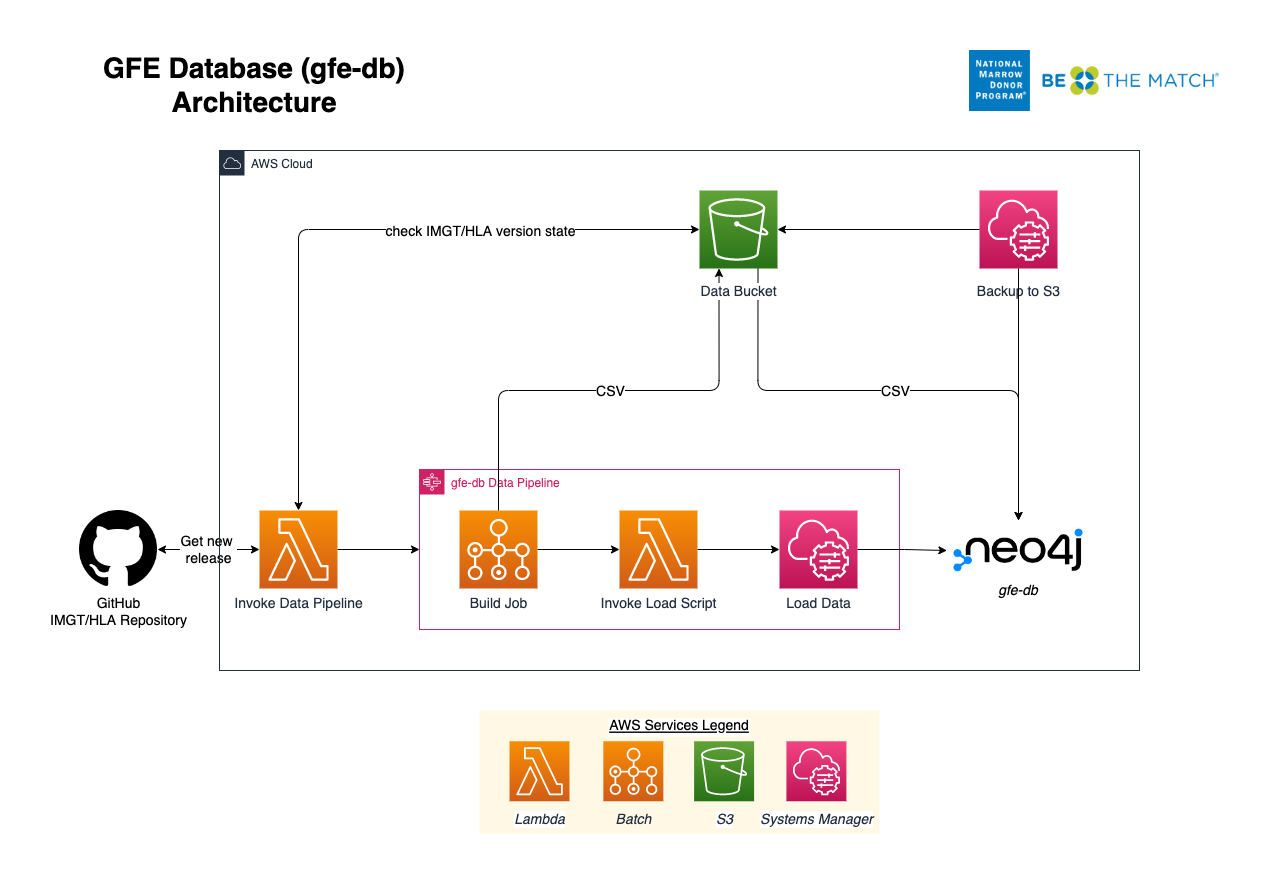
The AWS architecture for gfe-db is organized into 3 layers.
This allows deployments to be decoupled using Makefiles. Common configuration parameters are shared between resources using environment variables, JSON files, AWS SSM Parameter Store and Secrets Manager.
Base Infrastructure
The base infrastructure layer deploys a VPC, public subnet, S3 bucket, Elastic IP and common SSM parameters and secrets for the other services to use.
Database
The database layer deploys an EC2 instance running the Neo4j Community Edition into a public subnet. During initialization, Cypher queries are run to create constraints and indexes, which help speed up loading and ensure data integrity. Neo4j is ready to be accessed through a browser once the instance has booted sucessfully.
Data Pipeline
The data pipeline layer automates integration of newly released IMGT/HLA data into Neo4j using a scheduled Lambda which watches the source data repository and invokes the build and load processes when it detects a new IMGT/HLA version. The pipeline consists of a Step Functions state machine which orchestrates two basic processes: build and load. The build process employs a Batch job which produces an intermediate set of CSV files. The load process leverages SSM Run Command to copy the CSV files to the Neo4j server and execute Cypher statements directly on the server (server-side loading). When loading the full dataset of 35,000+ alleles, the build step will generally take around 15 minutes, however the load step can take an hour or more.