Reference
GFE Graph
The GFE database (gfe-db) represents the relationships between GFEs,
features, sequences and other types of data. The new schema is centered
around the GFE node and makes the curation and database versioning of
WHO designations or WHO labels an optional annotation of GFEs.

GFE nodes
Description
Each node represents a distinct GFE object. For example, a GFE with
gfe_name="HLA-Aw2-1-1-1-1-4-1-1-1-2-1-1-1-1-1-1-4" corresponds to a full
sequence and also 17 features: - FIVE_PRIME_UTR - EXON (1-8) - INTRON
(1-7) - THREE_PRIME_UTR
Properties
{
  "gfe_name": "HLA-Aw99-8-363-912-781-2901-128-581-151-324-198-9-316-80-508-43-30",
  "locus": "HLA-A"
}
Property |
Example |
Data Type |
Description |
|---|---|---|---|
|
HLA-Aw99-8-363-912-781-2901-128-581-151-324-198-9-316-80-508-43-30 |
string |
GFE name |
|
HLA-A |
string |
Position of the gene on the chromosome |
Feature nodes
Description
A feature is a tuple of: locus, term and rank. A locus is “anything in HUGO”, and a term is “anything in sequence ontology”.
Properties
{
  "accession": 99,
  "locus": "HLA-A",
  "rank": 1,
  "term": "FIVE_PRIME_UTR"
}
Property |
Example |
Data Type |
Description |
|---|---|---|---|
|
2901 |
string |
Relatively stable unique record identifier for a sequence |
|
HLA-A |
string |
Position of the gene on the chromosome |
|
7 |
string |
Ordinal number describing the position of the Feature sequence on the allele |
|
FIVE_PRIME_UTR |
string |
Label describing the type of Feature; One of FIVE_PRIME_UTR, EXON, INTRON, THREE_PRIME_UTR |
Sequence nodes
Description
The nucleotide sequence corresponding to the GFE.
Properties
{
  "gfe_name": "HLA-Cw393-14-261-132-1610-454-45-532-107-272-205-3-264-71-398-4-621",
  "length": 3918,
  "locus": "HLA-C",
  "seq_id": 27670532806245477286153332635897,
  "sequence": "TTATTTTGCTGGATGTAGTTTAATATTACCTGAGGTGAGGTAAGGTA..."
}
Property |
Example |
Data Type |
Description |
|---|---|---|---|
|
HLA-Cw393-14-261-132-1610-454-45-532-107-272-205-3-264-71-398-4-621 |
string |
Gene Feature Enumeration name |
|
3918 |
integer |
Length of nucleotide sequence |
|
HLA-C |
string |
Position of the gene on the chromosome |
|
27670532806245477286153332635897 |
integer |
Compressed UUID based on MD5 hash of sequence (used for faster indexing) |
|
TTATTTTGCTGGATGTAGTTTAATATTACCTGAGGTGAGGTAAGGTA… |
string |
Full nucleotide sequence |
IPD_Allele nodes
Note
IPD_Allele and IPD_ACC nodes replace the previous WHO nodes. Documentation
is in progress.
Description
Documentation in progress
Properties
{
  // Documentation in progress
}
Property |
Example |
Data Type |
Description |
|---|---|---|---|
IPD_ACC nodes
Note
IPD_Allele and IPD_ACC nodes replace the previous WHO nodes. Documentation
is in progress.
Description
Documentation in progress
Properties
{
  // Documentation in progress
}
Property |
Example |
Data Type |
Description |
|---|---|---|---|
Submitter nodes
Description
Describes the submitter of a GFE node.
Properties
{
  "email": "<email>",
  "institution": "<institution name>",
  "name": "<name>"
}
Property |
Example |
Data Type |
Description |
|---|---|---|---|
|
string |
Submitter’s email |
|
|
CIBMTR |
integer |
Submitter’s institution |
|
first name last name |
string |
Submitter’s full name |
HAS_FEATURE edges
Description
Links a GFE node to a Feature node.
Properties
{
  // No properties
}
HAS_SEQUENCE edges
Description
Links a GFE node to the full Sequence node.
Properties
{
  // No properties
}
HAS_IPD_Allele edges
Description
Links a GFE node to the IPD_Allele node.
Properties
{
  "releases": [3470, 3460]
}
Property |
Example |
Data Type |
Description |
|---|---|---|---|
|
[3470, 3460] |
array[integer] |
Release versions containing the relationship |
HAS_IPD_Allele edges
Description
Links an IPD_Allele node to the IPD_ACC node.
Properties
{
  "releases": 3470
}
Property |
Example |
Data Type |
Description |
|---|---|---|---|
|
3470 |
integer |
Release versions containing the relationship |
SUBMITTED edges
Description
Links the Submitter node to the GFE node.
Properties
{
  "submit_date": "2022-02-17"
}
Property |
Example |
Data Type |
Description |
|---|---|---|---|
|
2022-02-17 |
datetime string |
Date of submission |
Breaking down a GFE
Note
This section discusses the WHO and IMGT_HLA nodes which have
been deprecated.
The representation of a single GFE, for example corresponding to the
allele HLA-A*01:01:01:01 can be understood from the graph.
The GFE node points to a WHO node as one of possibly many annotations. With this schema it is possible to analyze GFEs that do not have an WHO label associated with it.
To see the how a GFE expands to its constituent components, the
following query returns the corresponding features associated with the
GFE referred to by the WHO allele HLA-A*01:03:01:01.
MATCH (:WHO {name:'HLA-A*01:03:01:01'})-[]-(:GFE)-[]-(f:Feature)
RETURN f.term, f.rank ORDER BY f.term, f.rank
Results:
f.term |
f.rank |
|---|---|
EXON |
1 |
EXON |
2 |
EXON |
3 |
EXON |
4 |
EXON |
5 |
EXON |
6 |
EXON |
7 |
EXON |
8 |
FIVE_PRIME_UTR |
1 |
INTRON |
1 |
INTRON |
2 |
INTRON |
3 |
INTRON |
4 |
INTRON |
5 |
INTRON |
6 |
INTRON |
7 |
THREE_PRIME_UTR |
1 |
These features each have an accession number that is unique in the context of the locus, term and rank combination and is a permanent reversible 1-to-1 mapping between the sequence and the accession number in that context.
Mapping is not permanent, reversible or 1-to-1 for these entity properties: - WHO/IMGT_HLA names and sequences - WHO/IMGT_HLA names and IMGT accession numbers - IMGT accession numbers and sequence
Here is a older example of a relationship between a WHO/IMGT_HLA allele
(HLA-DRB1*11:17) and the corresponding GFE.
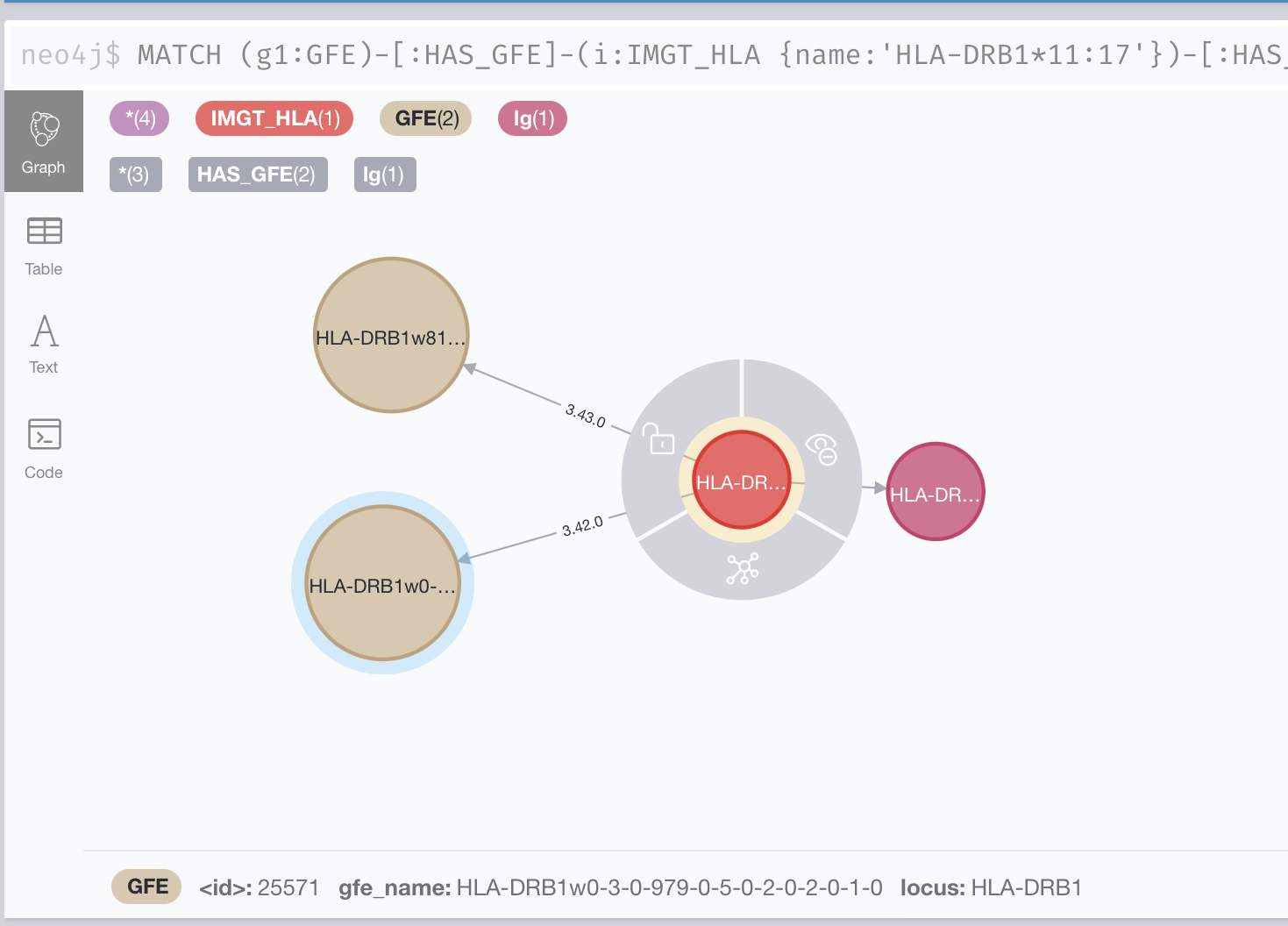
In this example, the GFE associated with this allele changed between 3.42.0 and 3.43.0
Service Configurations
Configuring is managed using JSON files, SSM Parameter Store, Secrets Manager, and shell variables. To deploy changes in these files, run the command.
make deploy.config
Graph Database
Neo4j
Custom configuration settings for Neo4j are contained in
neo4j.template. This file is copied into /etc/neo4j during boot
or manually. When Neo4j is restarted it will use the settings in
neo4j.template to overwrite neo4j.conf. More information can be
found in the documentation here at Neo4j Cloud Virtual Machines.
Important
Neo4j no longer supports the Community Edition of their AMI for EC2.
The next release of gfe-db will use the Bitnami Neo4j AMI which
will change this information.
Shell Scripts
Bash scripts are used for automating Neo4j configuration, loading and
backup. These are stored in S3 and executed on the database instance using
SSM Run Command. These are found in gfe-db/gfe-db/database/scripts/.
Cypher Scripts
Cypher scripts manage node constraints & indexes and load the data.
These are found in gfe-db/gfe-db/database/neo4j/cypher/.
Data Pipeline
Input Parameters
The pipeline-input.json is stored in S3 and contains the default
configuration used for automated updates.
// pipeline-input.json
{
  "align": "False",
  "kir": "False",
  "mem_profile": "False",
  "limit": ""
}
IMGT/HLA Release Versions State
The application’s state tracks which releases have been processed and
added to the database. This file tracks the releases which have already
been processed. If the gfe-db-invoke-pipeline function detects a
valid release branch in the source data repository that is not in the
releases array, it will start the pipeline for this release. Once
the update is finished, the processed release is appended to the array.
// IMGTHLA-repository-state.json
{
  "timestamp": "2021-12-09 02:36:59",
  "repository_url": "https://github.com/ANHIG/IMGTHLA",
  "releases": [
    "3100",
    // ...,
    "3470"
  ]
}
Variable |
Example Value |
Type |
Description |
|---|---|---|---|
repository_url |
string |
The repository the trigger is watching |
|
releases |
[“3100”, …, “3470”] |
array of strings |
List of available releases. Any release added to the repository that is not in this list will trigger the pipeline build. |
Logging
Logs for EC2, Lambda and Batch are collected by CloudWatch Logs.
Makefile Command Reference
To see a list of possible commands using Make, run make on the
command line.
Deploy to AWS
Deploy all CloudFormation based services:
make deploy
Deploy specific stacks.
make deploy.infrastructure
make deploy.database
make deploy.pipeline
Deploy config files and scripts to S3:
make deploy.config
Load releases
Run the StepFunctions State Machine to load Neo4j:
make load.database releases=<version> align=<boolean> kir=<boolean> limit=<int>
Retrieve logs, data and configuration values
Download CSV data from S3 to ./data:
make get.data
Download logs from EC2 to ./logs:
make get.logs
Display the Neo4j Browser endpoint URL:
make get.neo4j
Tear down infrastructure
Delete all CloudFormation based services and data:
make delete
Delete specific stacks (may cause issues):
make delete.infrastructure
make delete.database
make delete.pipeline